Salesforce Apex, LWC and Java Flow Analyzer › Guides › Apex class diagram
How to generate a class diagram from Salesforce Apex
Reading a Salesforce codebase one .cls file at a time hides the big picture. The fastest way to understand it is a class diagram — an architecture map of every class and component and how they connect. Here's how to generate one straight from a local project folder, with no server, build step, or upload.
Generate the diagram in 3 steps
- Open Salesforce Apex, LWC and Java Flow Analyzer and click Open Folder. Pick your project root (for example an SFDX project), or just drag in individual
.cls,.js, or.htmlfiles. - Let it index. The source is scanned locally in the background and an architecture map is built automatically — Apex, LWC, LWC-child and HTML nodes are color-coded so the structure reads at a glance.
- Explore the map. Pan and zoom, collapse nodes, expand referenced "ghost" classes on demand, and open any class's source in a syntax-highlighted modal. You can also copy the underlying Mermaid definition.
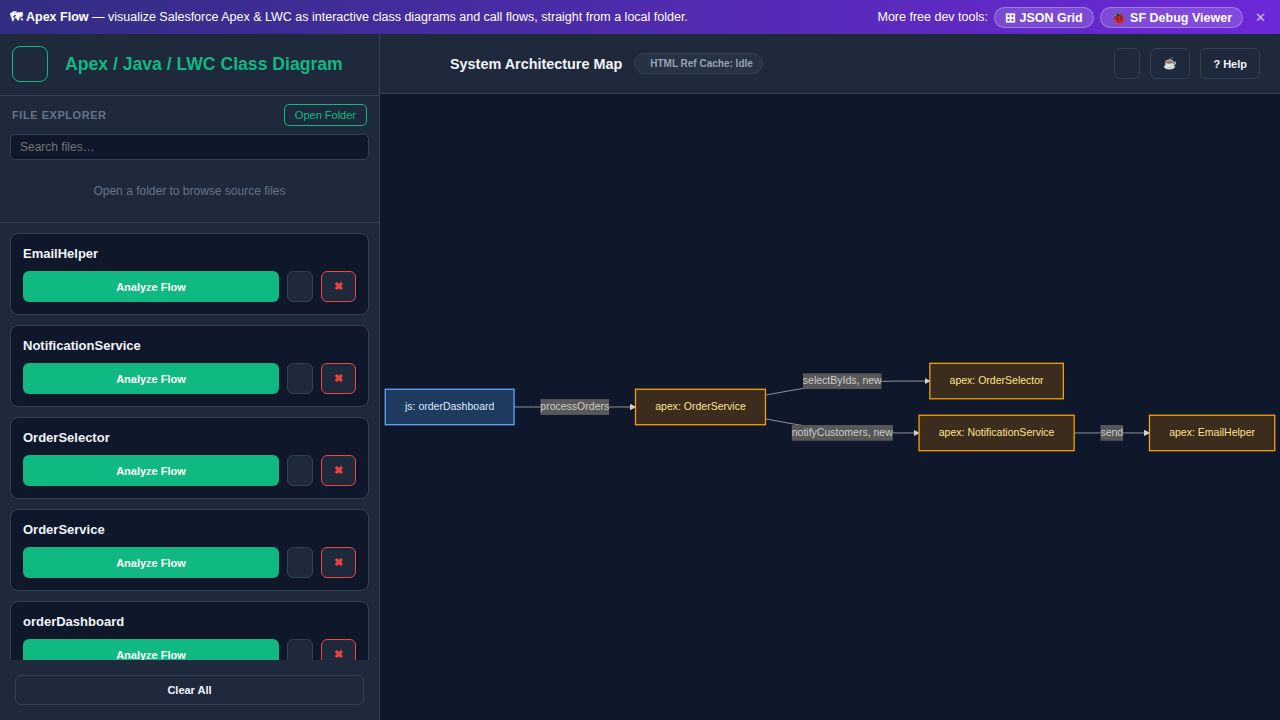
Why an architecture map beats reading files
- One picture of the whole project — every class and component and the edges between them.
- Apex + LWC + Java together, including cross-language links such as an LWC's
@salesforce/apex/...import pointing at the Apex it calls. - Drill down on demand — collapse what you don't need and expand ghost nodes for classes you haven't loaded yet.
- Private — files are read with the browser's File System Access API and never uploaded.
No build step required: Salesforce Apex, LWC and Java Flow Analyzer parses the source in the browser, so you can point it at a checkout and have a diagram in seconds — handy for onboarding, reviews, and impact analysis.
Frequently asked questions
- How do I generate a class diagram from Salesforce Apex?
- Open Salesforce Apex, LWC and Java Flow Analyzer, click Open Folder and choose your project root (or drop
.clsfiles). It scans locally and builds an interactive architecture map of your classes and their relationships — no server, build step, or upload. - Can I create a UML-style diagram of Apex and LWC together?
- Yes. Apex, LWC, LWC-child and HTML render as color-coded nodes in one diagram, including cross-language links like an LWC's
@salesforce/apeximport pointing at the Apex class it calls. - Is my Salesforce code uploaded anywhere?
- No. Files are read locally via the File System Access API and parsed in the browser — nothing is sent to a server.